
 Safe Rust bindings for the Skia Graphics Library.







Skia Submodule Status: chrome/m155 (upstream changes, our changes).
This project provides up to date safe bindings that bridge idiomatic Rust with Skia's C++ API on desktop and mobile platforms, including GPU rendering backends for Vulkan, Metal, OpenGL, and Direct3D.
The skia-safe API documentation is available on docs.rs.
A prerelease crate is available from crates.io. To get started, run
cargo add skia-safein your project's folder. And you might want to take a look at the gl-window example if you plan to render to a window.
Because building Skia takes a lot of time and needs tools that may be missing, the skia-bindings crate's build.rs attempts to download prebuilt binaries from the skia-binaries repository using the curl command line tool.
| Platform | Binaries |
|---|---|
| Windows | x86_64-pc-windows-msvcaarch64-pc-windows-msvc |
| Linux (glibc ≥ 2.31, libstdc++ ≥ GLIBCXX_3.4.28) | x86_64-unknown-linux-gnuaarch64-unknown-linux-gnu |
| macOS | x86_64-apple-darwinaarch64-apple-darwin |
| Android | aarch64-linux-androidx86_64-linux-android |
| iOS | aarch64-apple-iosaarch64-apple-ios-simx86_64-apple-ios |
| WebAssembly | wasm32-unknown-emscripten |
The glibc and libstdc++ requirements are those of the container the binaries are built in, so they
are at least Ubuntu 20.04, Debian 11, Fedora 32,
and CentOS Stream 9. The build script does not detect this on its own: on an older system the
downloaded binaries fail to link. In that case, set FORCE_SKIA_BUILD=1 (or disable the
binary-cache feature) to build Skia from source instead.
The supported wrappers, Skia codecs, and additional Skia features are documented in the skia-safe package's readme. Prebuilt binaries are available for most feature combinations.
If the target platform or feature configuration is not available as a prebuilt binary, skia-bindings' build.rs will try to build Skia and generate the Rust bindings.
For building Skia from source, LLVM, Python 3, and Ninja are required:
LLVM
We recommend the version that comes preinstalled with your platform, or, if not available, the latest official LLVM release. To see which version of LLVM/Clang is installed on your system, use clang --version.
Python 3
The build script probes for python --version and python3 --version and uses the first one that looks like a version 3 executable for building Skia.
Ninja
The build system for Skia. ninja is available as a binary package on all major platforms. Install ninja or ninja-build and make sure it is in your PATH with ninja --version.
-
Install the Command Line Tools for Xcode with
xcode-select --install
or download and install the Command Line Tools for Xcode.
-
As an alternative to Apple's Xcode LLVM, install LLVM via
brew install llvmand then setPATH,CPPFLAGS, andLDFLAGSas instructed.If the environment variables are not set, bindgen will most likely use the wrong
libclang.dyliband cause confusing compilation errors (see #228).
-
Have the latest versions of
gitand Rust ready. -
Install Visual Studio 2022 Build Tools or one of the other IDE editions. If you installed the IDE, make sure that the Desktop Development with C++ workload is installed.
-
Install the latest LLVM distribution.
If the environment variable
LLVM_HOMEis not defined, the build script will look for LLVM installations located atC:\Program Files\LLVM\,C:\LLVM\, and%USERPROFILE%\scoop\apps\llvm\current\. -
- Install Python 3 with
pacman -S python.
- Install Python 3 with
-
Windows Shell (
Cmd.exe):- Download and install Python 3 from python.org.
-
Install and select the MSVC toolchain:
rustup default stable-msvc
- LLVM/Clang should be available already, if not, install the latest version.
- If OpenGL libraries are missing, install the drivers for you graphics card, or a mesa package like
libgl1-mesa-dev. - For X11, build with feature
x11. - For Wayland, install
libwayland-devand build with thewaylandfeature.
Cross compilation to Android is supported for targeting 64 bit ARM and Intel x86 architectures (aarch64 and x86_64) for API Level 26 (Oreo, Android 8):
We recommend using cargo apk, but if that does not work for you, following are some instructions on how we build Android targets with GitHub Actions:
For example, to compile for aarch64:
- Install the Rust target:
rustup target install aarch64-linux-android
- Download the r26d NDK (or newer) for your host architecture and unzip it.
- Compile your project for the
aarch64-linux-androidtarget:
On macOS:
export ANDROID_NDK=:path-to-android-ndk-r26d
export PATH=$PATH:$ANDROID_NDK/toolchains/llvm/prebuilt/darwin-x86_64/bin
export CC_aarch64_linux_android=aarch64-linux-android26-clang
export CXX_aarch64_linux_android=aarch64-linux-android26-clang++
export AR_aarch64_linux_android=llvm-ar
export CARGO_TARGET_AARCH64_LINUX_ANDROID_LINKER=aarch64-linux-android26-clang

cargo build -vv --target aarch64-linux-android
We don't support Apple's Clang to build for Android on macOS, so you need to install LLVM and set the PATH like instructed.
On Linux:
export ANDROID_NDK=:path-to-android-ndk-r26d
export PATH=$PATH:$ANDROID_NDK/toolchains/llvm/prebuilt/linux-x86_64/bin
export CC_aarch64_linux_android=aarch64-linux-android26-clang
export CXX_aarch64_linux_android=aarch64-linux-android26-clang++
export AR_aarch64_linux_android=llvm-ar
export CARGO_TARGET_AARCH64_LINUX_ANDROID_LINKER=aarch64-linux-android26-clang

cargo build -vv --target aarch64-linux-android
On Windows the Android NDK Clang executable must be invoked through .cmd scripts:
export ANDROID_NDK=:path-to-android-ndk-r26d
export PATH=$PATH:$ANDROID_NDK/toolchains/llvm/prebuilt/windows-x86_64/bin
export CC_aarch64_linux_android=aarch64-linux-android26-clang.cmd
export CXX_aarch64_linux_android=aarch64-linux-android26-clang++.cmd
export AR_aarch64_linux_android=llvm-ar
export CARGO_TARGET_AARCH64_LINUX_ANDROID_LINKER=aarch64-linux-android26-clang.cmd

cargo build -vv --target aarch64-linux-android
Notes:
- At the time of this writing, the Rust compiler will automatically add a
-lgccargument to the linker, which results in a linker error, because newer NDKs do not containlibgcc.aanymore. To fix this, we created a workaround and copylibunwind.aover tolibgcc.a. Cargo apk does something similar. - The
CARGO_TARGET_${TARGET}_LINKERenvironment variable name needs to be all uppercase. - In some older shells (for example macOS High Sierra), environment variable replacement can not be used when the variable was defined on the same line. Therefore the
ANDROID_NDKvariable must be defined before it's used in thePATHvariable. - Rebuilding skia-bindings with a different target may cause linker errors, in that case
touch skia-bindings/build.rswill force a rebuild (#10).
Compilation to iOS is supported on macOS targeting the iOS simulator (--target x86_64-apple-ios and --target aarch64-apple-ios-sim) and 64 bit ARM devices (--target aarch64-apple-ios). The ARM64e architecture is not supported yet.
Compilation to visionOS is supported on macOS targeting visionOS devices (--target aarch64-apple-visionos) and the visionOS simulator (--target aarch64-apple-visionos-sim). These are Rust tier 3 targets, so a nightly toolchain and -Z build-std are required, and the visionOS SDK must be installed via Xcode. Skia itself has no dedicated visionOS configuration, so it is built using its iOS code paths against the visionOS (xros) SDK. Prebuilt binaries are not provided; Skia is built from source. Only Metal is available as a GPU backend (visionOS has no OpenGL).
Install emscripten version 5.0 or newer — the emsdk ships its own clang 23 (5.x) / clang 24 (6.x) to compile the wasm code. It does not ship a libclang library, which the binding generator additionally needs on the host (see [Building — On macOS] and [Building — On Linux]). (emsdk 4.x is not supported: its WebGL sync function signatures changed during the 4.x series, while Skia's version gate still assumes the 5.x layout.) The recommended way to install Emscripten is the emsdk tool:
git clone https://github.com/emscripten-core/emsdk.git
cd emsdk
./emsdk install latest-stable
./emsdk activate latest-stable
source ./emsdk_env.sh
Build with the wasm32-unknown-emscripten target (wasm32-unknown-unknown is
unsupported because it is fundamentally incompatible with linking C code:
export EMSDK=<path-to-emsdk>
export EMCC_CFLAGS="-s ERROR_ON_UNDEFINED_SYMBOLS=0"

cargo build --target wasm32-unknown-emscripten
The EMSDK environment variable must be set to the root of your emscripten SDK. It can point to
the emsdk install root (its upstream/emscripten directory is detected), directly to an activated
emscripten installation, or to the unpacked toolchain of a bare
emscripten release archive.
The build script detects the layout automatically.
In EMCC_CFLAGS, -s ERROR_ON_UNDEFINED_SYMBOLS is a
workaround to build with
emscripten > 2.0.9.
If you want to enable WebGL, you will also have to set MAX_WEBGL_VERSION=2:
export EMSDK=<path-to-emsdk>
export EMCC_CFLAGS="-s ERROR_ON_UNDEFINED_SYMBOLS=0 -s MAX_WEBGL_VERSION=2"

cargo build --target wasm32-unknown-emscripten --features gl
On macOS there is a problem with the OS version of ar so you will have to install the GNU version from homebrew:
brew install binutilsThen prepend the binutils path to PATH. The path depends on your CPU
architecture, and can be retrieved with brew info binutils. Here is an
example for Apple silicon:
export EMSDK=<path-to-emsdk>
export EMCC_CFLAGS="-s ERROR_ON_UNDEFINED_SYMBOLS=0"
export PATH="/opt/homebrew/opt/binutils/bin:$PATH"

cargo build --target wasm32-unknown-emscriptencargo build is sufficient to build the bindings including Skia. For situations in which Skia does not build or needs to be configured differently, some customization is supported in skia-bindings/build.rs. For more details take a look at the README of the skia-bindings package.
Please share your build experience so that we can try to automate the build further.
An example that opens an OpenGL Window and draws the rust-skia icon with skia-safe (contributed by @nornagon).
cargo run --example gl-window --features glOn Linux the feature x11 needs to be enabled:
cargo run --example gl-window --features gl,x11An example application that opens a Window and renders a blue rectangle using Vulkano (contributed by @samizdatco in #1066)
cargo run --example vulkan-window --features "ganesh,vulkan"To enable Vulkan validation layer messages and debug output in this example:
cargo run --example vulkan-window --features "ganesh,vulkan" -- --validateTo add Vulkan support to your system, the easiest way is to install the LunarG SDK, and enable "System Global Installation" in the installer.
An example application that opens a Metal Window and renders a blue rectangle using Skia's Ganesh backend. It is only supported on macOS.
cargo run --example metal-window --features "ganesh,metal"The same window example, but rendering with Skia's Graphite backend instead of Ganesh. It is only supported on macOS.
cargo run --example metal-window-graphite --features "graphite,metal"An example application that opens a Window and renders a rectangle using Direct3D 12 and Skia's Ganesh backend (most of the code is adapted from the windows-rs Direct3D 12 sample). It is only supported on Windows. Use the arrow keys to move the rectangle and Escape to quit.
cargo run --example d3d-window --features d3dThe icon example generates the rust-skia icon in the current directory.
It computes the position of all the gear teeth etc. based on parameters such as the number of teeth and wheel radius.
If you were able to build the project, run
cargo run --example icon 512It has a single optional parameter which is the size in pixels for the PNG file. Without parameters, it’ll produce PNG frames for the animated version.
The other examples are taken from Skia's website and ported to the Rust API.
cargo run -- [OUTPUT_DIR]to generate some Skia drawn PNG images in the directory OUTPUT_DIR. To render with OpenGL, use
cargo run --features gl -- [OUTPUT_DIR] --driver glAnd to show the drivers that are supported
cargo run -- --helpFill, Radial Gradients, Stroke, Stroke with Gradient, Transparency:
Fill, Stroke, Text:
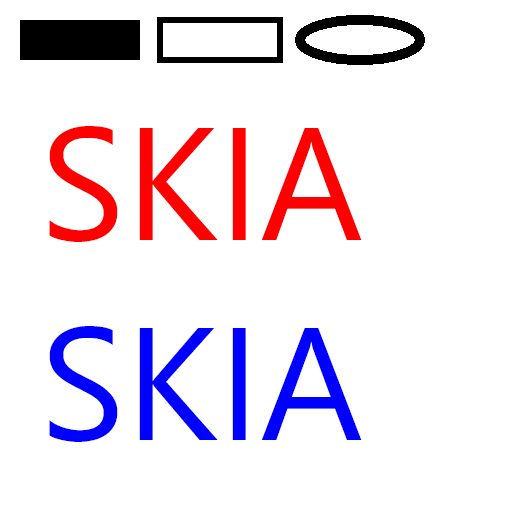
Sweep Gradient:

Dash Path Effect:
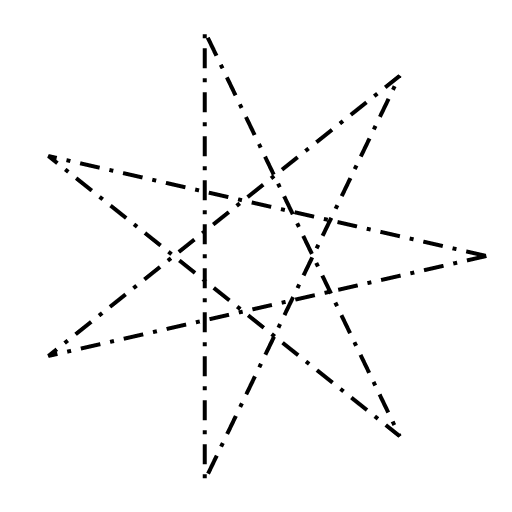
For more, you may take a look at the rust-skia.github.io repository.
If you'd like to help with the bindings, take a look at the Wiki to get started and create an issue to prevent duplicate work. For smaller tasks, grep for "TODO"s in the source code. And for heroic work, check out the label help wanted. And if you'd like to help make the Rust API nicer to use, look out for open issues with the label api ergonomics.
More details can be found at CONTRIBUTING.md.
- Denis Kolodin (@DenisKolodin) contributed build support for Android.
- Alberto González Palomo (@AlbertoGP) designed the Rust-Skia Logo and the example program that renders it.
- Luper Rouch (@flupke, sponsored by Jitter)
added build support for the
wasm32-unknown-emscriptentarget. - Osei Fortune (@triniwiz) and Savchenko Ivan (@Aiving) contributed rendering SVG files.
- Maxime Vincent (@maximevince) contributed the Skottie/Lottie support and examples.
- LongYinan (@Brooooooklyn)
- Armin (@pragmatrix)
MIT