









uproot-browser is a plotext based command line library in which the command line interface is provided by Click. It is powered by Hist and it's TUI is put together by Textual. Its aim is to enable a user to browse and look inside a ROOT file, completely via the terminal. It takes its inspiration from the ROOT object browser.
You can install this library from PyPI with pip or uv:
python3 -m pip install uproot-browserYou can also use pipx run or uvx to run the library without installing it; for example, this will let you try it out in one line:
uvx uproot-browser[testdata] --testdata uproot-Event.rootuproot-browser currently provides the following features (get help with -h or --help, view the current version with --version):
browsecan be used to display a TUI (text user interface), acts as default if no subcommand specified.plotcan be used to display a plot.treecan be used to display a tree.browseandtreealso accept a directory, and show the ROOT files in it and in its subdirectories. Useplot DIR:FILE.root/OBJECTto plot an object in a file of a directory.browseprovides a right-side axis panel with typed X and Y range controls.- The right-side panel can be shown or hidden with
t(tools). - Drag the bar next to a side panel to resize it.
- The plot expression entry box can be shown or hidden with
e. - Image-mode render scaling is available from the right-side panel.
browsesupports counted tree navigation with arrow keys orj/k, with the pending count displayed above the footer.- Press
/inbrowseto open a fuzzy finder over the tree. - Press
mon two numeric branches or fields inbrowseto plot them against each other as a 2D histogram. - Press
dinbrowseto quit and print standalone Python code that reproduces the current plot.
This example uses data from the scikit-hep-testdata package. The --testdata flag will load from there if it is installed; use the [testdata] extra if you want to play with it.
browse command:
uproot-browser browse --testdata uproot-Event.root
To transform a plot, select a numeric branch or field and press e to
open the entry box. Enter one Python expression and press enter.
The expression sees h, the default histogram, and tree, the containing
TTree or RNTuple (only when the selected object is inside one). The modules
ak, np, and hist are also available.
For example, with a branch selected from uproot-Event.root, this plots track
momentum values with a cut using the normal uproot API:
tree["fTracks.fPx"].array()[tree["fTracks.fPy"].array() < 0]Array results are flattened, filtered to finite values, and histogrammed with
the bin count of h: the plot width in browse, and 50 in browse --image.
Fill your own hist.Hist in the expression to choose the binning. Histogram
expressions such as h[::2j] also work, as do objects with a to_hist()
method. The result of an expression that does not use h is cached, so a
resize or theme change does not read the tree again.
When a plottable object is selected in browse, the right-side Axis scaling panel provides typed fields for the X and Y limits. Press Enter in a field or choose Apply ranges to update the plot. Leave a field blank to use the automatic range, or choose Reset to automatic to clear both axes.
The render scale control (in browse --image) and theme selector are also located in this panel. The Tree and Info tabs remain on the left. Use the following keyboard shortcuts from the bottom footer:
b Navbar t Tools e Entry Box / Jump m Mark 2D q Quit d Dump & Quit F1 Help
Use Up/Down or k/j to move through the tree, and type a count first to
repeat a move (12j). Press F1 in the browser for all keys.
plot command:
uproot-browser plot --testdata uproot-Event.root:hstat
                        hstat -- Entries: 1000
    ┌───────────────────────────────────────────────────────────────┐
18.0┤▐▌                                                             │
    │▐▌                                                 ▗▖         ▄│
15.6┤▐▌▗▖                                               ▐▌         █│
    │███▌               █                           █   ▐▌        ▐█│
13.1┤████▟▌    ▗▖  ▗▖   █▌▗▖ ▐▌       ▄   █▌   ▄  ▟▌█ ▗▄▐▙▗▖    ▐▌▐█│
10.6┤█████▌    ▐▌  ▐▙▖  █▌▐▌ ▐▙       █▄  █▙   █  █▌█ ▐█▟█▐▌  ▗▄▟▌▐█│
    │█████▌ █▌▐█▌  ████▌█▌▐█ ▐█▐▌ ▐▌  ███▐██  ▐█ ▐████▐███▐▌ ▐███▌▐█│
 8.2┤█████▌▐█▌▐█▌ █████▌██▐█ ██▐█ ▐▌▐████▐███▌▐█ █████▐███▐██▐████▐█│
    │████████▙██▌█████████▟█▖████▖▟██████▟██████▖████████████▟██████│
 5.8┤███████████▙███████████▙████▌██████████████▌███████████████████│
    │████████████████████████████▌██████████████████████████████████│
 3.3┤███████████████████████████████████████████████████████████████│
    └┬───────────────┬──────────────┬───────────────┬──────────────┬┘
     0.00          0.25           0.50            0.75          1.00
[x] xaxisIf your terminal supports images (Sixel or TGP, such as iTerm2), you can use --image mode.
You can get an image plot, the required dependencies can be installed via:
python3 -m pip install uproot-browser[image]Or can be run via pipx or uvx without installing:
uvx uproot-browser[image] ...Adding the argument --image gives us the plot:
uproot-browser plot --testdata uproot-Event.root:T/fTracks.fPz --imageUse --save to write the plot to a file instead (any matplotlib format,
with a transparent background where the format supports it):
uproot-browser plot --testdata uproot-Event.root:T/fTracks.fPz --save myplot.png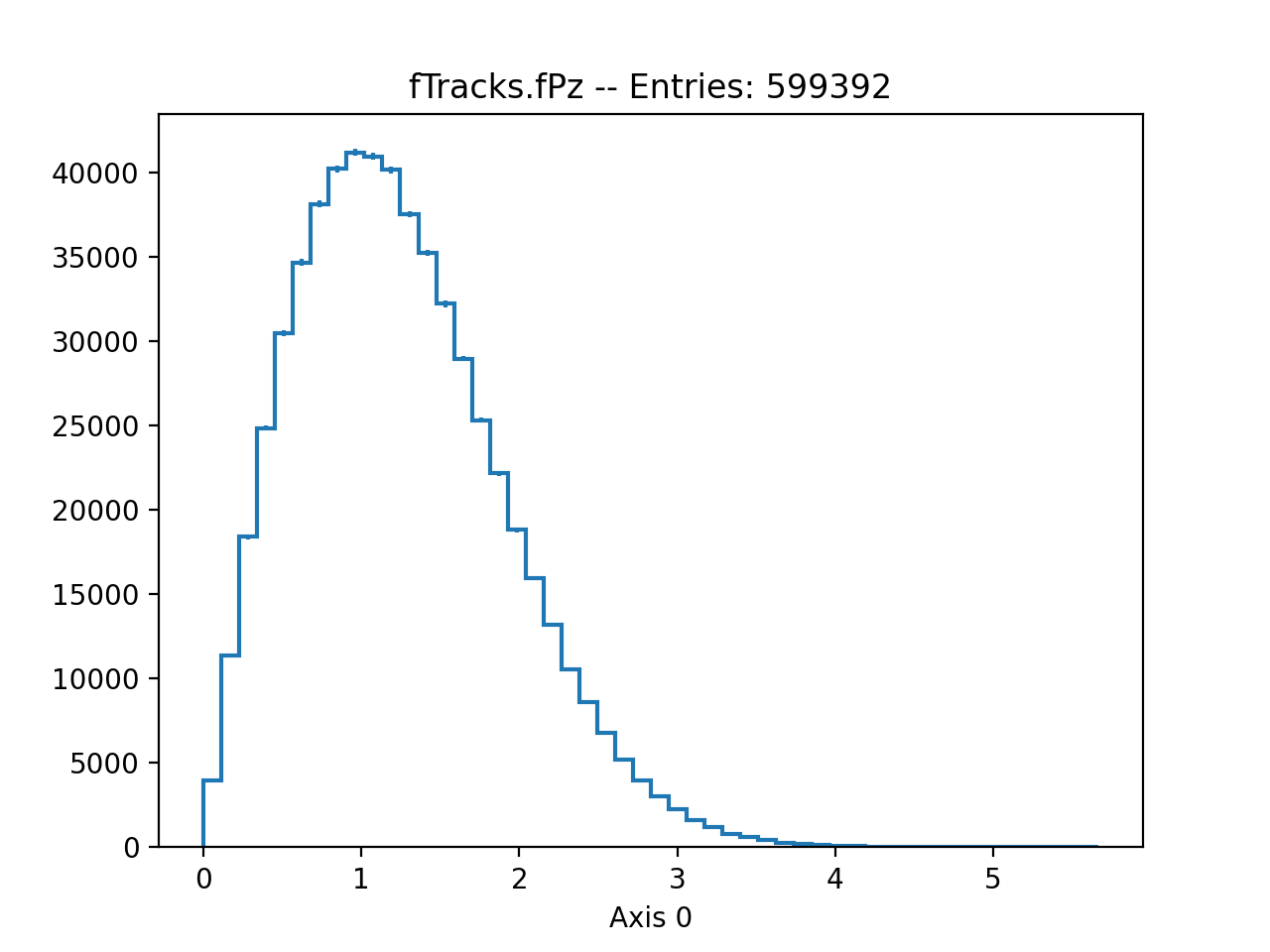
tree command:
uproot-browser tree --testdata uproot-Event.root
📁 uproot-Event.root
┣━━ ❓ <unnamed> TProcessID
┣━━ 🌴 T (1000)
┃   ┗━━ 🌿 event Event
┃       ┣━━ 🌿 TObject (group of fUniqueID:uint32_t, fBits:uint32_t)
┃       ┃   ┣━━ 🍁 fBits uint32_t
┃       ┃   ┗━━ 🍁 fUniqueID uint32_t
┃       ┣━━ 🍁 fClosestDistance unknown[]
┃       ┣━━ 🍁 fEventName char*
┃       ┣━━ 🌿 fEvtHdr EventHeader
┃       ┃   ┣━━ 🍁 fEvtHdr.fDate int32_t
┃       ┃   ┣━━ 🍁 fEvtHdr.fEvtNum int32_t
┃       ┃   ┗━━ 🍁 fEvtHdr.fRun int32_t
┃       ┣━━ 🍁 fFlag uint32_t
┃       ┣━━ 🍁 fH TH1F
┃       ┣━━ 🍁 fHighPt TRefArray*
┃       ┣━━ 🍁 fIsValid bool
┃       ┣━━ 🍁 fLastTrack TRef
┃       ┣━━ 🍁 fMatrix[4][4] float[4][4]
┃       ┣━━ 🍁 fMeasures[10] int32_t[10]
┃       ┣━━ 🍁 fMuons TRefArray*
┃       ┣━━ 🍁 fNseg int32_t
┃       ┣━━ 🍁 fNtrack int32_t
┃       ┣━━ 🍁 fNvertex uint32_t
┃       ┣━━ 🍁 fTemperature float
┃       ┣━━ 🌿 fTracks TClonesArray*
┃       ┃   ┣━━ 🍃 fTracks.fBits uint32_t[]
┃       ┃   ┣━━ 🍃 fTracks.fBx Float16_t[]
┃       ┃   ┣━━ 🍃 fTracks.fBy Float16_t[]
┃       ┃   ┣━━ 🍃 fTracks.fCharge Double32_t[]
┃       ┃   ┣━━ 🍃 fTracks.fMass2 Float16_t[]
┃       ┃   ┣━━ 🍃 fTracks.fMeanCharge float[]
┃       ┃   ┣━━ 🍃 fTracks.fNpoint int32_t[]
┃       ┃   ┣━━ 🍃 fTracks.fNsp uint32_t[]
┃       ┃   ┣━━ 🍁 fTracks.fPointValue unknown[][]
┃       ┃   ┣━━ 🍃 fTracks.fPx float[]
┃       ┃   ┣━━ 🍃 fTracks.fPy float[]
┃       ┃   ┣━━ 🍃 fTracks.fPz float[]
┃       ┃   ┣━━ 🍃 fTracks.fRandom float[]
┃       ┃   ┣━━ 🍃 fTracks.fTArray[3] float[][3]
┃       ┃   ┣━━ 🍁 fTracks.fTriggerBits.fAllBits uint8_t[][]
┃       ┃   ┣━━ 🍃 fTracks.fTriggerBits.fBits uint32_t[]
┃       ┃   ┣━━ 🍃 fTracks.fTriggerBits.fNbits uint32_t[]
┃       ┃   ┣━━ 🍃 fTracks.fTriggerBits.fNbytes uint32_t[]
┃       ┃   ┣━━ 🍃 fTracks.fTriggerBits.fUniqueID uint32_t[]
┃       ┃   ┣━━ 🍃 fTracks.fUniqueID uint32_t[]
┃       ┃   ┣━━ 🍃 fTracks.fValid int16_t[]
┃       ┃   ┣━━ 🍃 fTracks.fVertex[3] Double32_t[][3]
┃       ┃   ┣━━ 🍃 fTracks.fXfirst Float16_t[]
┃       ┃   ┣━━ 🍃 fTracks.fXlast Float16_t[]
┃       ┃   ┣━━ 🍃 fTracks.fYfirst Float16_t[]
┃       ┃   ┣━━ 🍃 fTracks.fYlast Float16_t[]
┃       ┃   ┣━━ 🍃 fTracks.fZfirst Float16_t[]
┃       ┃   ┗━━ 🍃 fTracks.fZlast Float16_t[]
┃       ┣━━ 🌿 fTriggerBits TBits
┃       ┃   ┣━━ 🌿 fTriggerBits.TObject (group of fTriggerBits.fUniqueID:uint32_t, fTriggerBits.fBits:uint32_t)
┃       ┃   ┃   ┣━━ 🍁 fTriggerBits.fBits uint32_t
┃       ┃   ┃   ┗━━ 🍁 fTriggerBits.fUniqueID uint32_t
┃       ┃   ┣━━ 🍃 fTriggerBits.fAllBits uint8_t[]
┃       ┃   ┣━━ 🍁 fTriggerBits.fNbits uint32_t
┃       ┃   ┗━━ 🍁 fTriggerBits.fNbytes uint32_t
┃       ┣━━ 🍁 fType[20] int8_t[20]
┃       ┗━━ 🍁 fWebHistogram TRef
┣━━ 📊 hstat TH1F (100)
┗━━ 📊 htime TH1F (10)
See CONTRIBUTING.md for details on how to set up a development environment.