


This repo contains the source code for Intellireading Calibre plugins. These plugins allow you to generate metaguided versions of your ebooks, by implementing a streamlined version of the Intellireading algorithm, using the Calibre ebook manager.
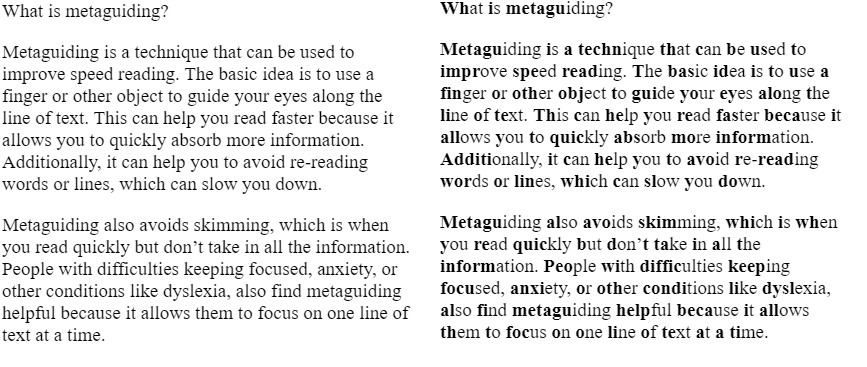
Example of a text converted to a metaguided text:
This repo is part of the Intellireading project, which aims to help people with dyslexia, ADHD, or anyone who wants to improve their reading focus and speed.
- Intellireading website, which allows anyone to convert an Epub to the metaguided version.
- API Server, that support the Intellireading website.
- CLI Tool. A standalone tool and library that can be used to metaguide epub files.
- Calibre Plugins. A set of plugins that can be used to metaguide epub files using Calibre.
Metaguiding is a technique that can be used to improve your reading focus and speed (sometimes called Bionic Reading). It is based on the idea that you can use a visual guide to help your eyes focus on the text you are reading. In this case, the visual guide is done by bolding a part of the text, creating visual anchors that your eyes can use to focus on the text. This is similar to the way a finger can be used to guide your eyes along a line of text, which has been shown to improve reading speed and focus. (study: "Does finger-tracking point to child reading strategies")
However, unlike a finger, the visual guide is not distracting, and it can be used to guide your eyes along multiple lines of text at once. This allows you to read faster, and with less effort.
Metaguiding is particulary useful for people with dyslexia or ADHD, but it can be used by anyone who wants to improve their reading focus and speed. For more information, visit the Intellireading website.
By default, metaguided EPUBs include an IntelliReading about/donation page at the end. The page is added only when a book is metaguided for the first time; books that are already metaguided are copied unchanged.
You can disable the page in the settings of each plugin:
- Epub Metaguider GUI (Interface Action): Preferences → Advanced → Plugins → EBook Metaguider (intellireading) → Customize plugin.
- Epub Metaguider post processor (FileType): Preferences → Advanced → Plugins → EPUB Metaguider - Post Processor (intellireading) → Customize plugin.
- Epub Metaguider output format (Output Format): when converting to EPUB, open the "Epub Output (metaguided)" section and uncheck "Add IntelliReading about/donation page".
- KoboTouch Metaguider (Device Interface): Configure device → Collections, covers && uploads → IntelliReading → uncheck "Add IntelliReading about/donation page".
To remove the page from a book that was already metaguided, use "Remove metaguiding" and then metaguide the book again. "Remove metaguiding" always removes the about page, regardless of this setting.
The fixation level controls how much of each word is bolded. It ranges from 1 (least bold) to 5 (most bold) and defaults to 3, which is the historical IntelliReading behaviour. Higher levels never bold less of each word.
You can change it in the settings of each plugin:
- Epub Metaguider GUI (Interface Action): Preferences → Advanced → Plugins → EBook Metaguider (intellireading) → Customize plugin → Fixation level.
- Epub Metaguider post processor (FileType): Preferences → Advanced → Plugins → EPUB Metaguider - Post Processor (intellireading) → Customize plugin → Fixation level.
- Epub Metaguider output format (Output Format): when converting to EPUB, open the "Epub Output (metaguided)" section and choose a Fixation level.
- KoboTouch Metaguider (Device Interface): Configure device → Collections, covers && uploads → IntelliReading → Fixation level.
The fixation level applies only to new conversions. EPUB files that are already metaguided are copied unchanged; use "Remove metaguiding" and then metaguide the book again to apply a different level. Standalone XHTML files have no metaguided marker, so avoid running metaguiding twice on the same file.
Calibre is a free and open-source e-book manager. It is used for cataloging, converting, reading and syncing e-books with e-book reader devices. It is primarily a free software suite developed by users of e-books for users of e-books. For more information, visit the Calibre website.
These plugins are available in the Calibre Plugin Store, and can be installed from the Calibre interface. You can also download the plugins from this repo, and install them manually. All plugins are compatible with Calibre 6.5.0 and above.
Adds buttons to the Calibre interface, allowing you to generate metaguided versions of your ebooks from the Main Toolbar or the Context Menu.
Extends the KoboTouch driver, allowing you to automatically generate metaguided versions of your ebooks when sending them to your Kobo device.
These plugins are not available in the Calibre Plugin Store, and can be installed from the Calibre interface only. Download these plugins from this repo, and install them manually.
Extends the epub output format, allowing you to generate metaguided versions of your ebooks when converting to epub.
Works on post conversion and post import, allowing you to generate metaguided versions of your ebooks when converting to epub or importing epub files.