


jless, but you can actually edit things.
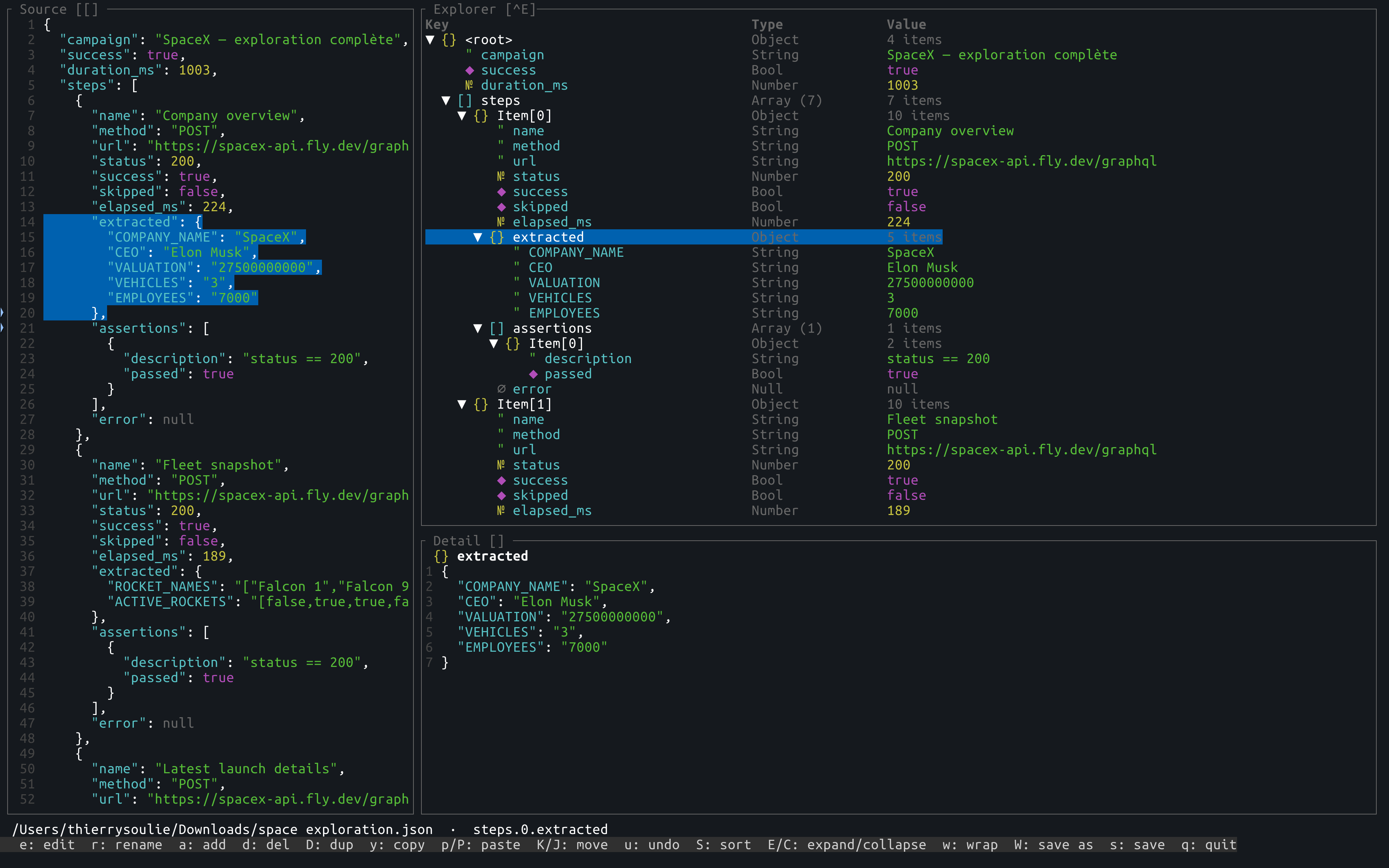
Keyboard-driven TUI for viewing and editing JSON files — with full structural editing, undo/redo, search, and format conversion between JSON, YAML, TOML, CSV, and JSONL.
| Tool | View | Edit | Convert | Diff | Pipe mode |
|---|---|---|---|---|---|
| jsoned | ✓ | ✓ full | ✓ | ✓ structural | ✓ |
| jless | ✓ | ✗ read-only | ✗ | ✗ | ✗ |
| fx | ✓ | ✗ filter only | ✗ | ✗ | ✗ |
| jq | ✗ no TUI | ✗ | partial | ✗ | ✓ |
| difftastic / delta | ✗ no TUI | ✗ | ✗ | ✓ line-based | ✓ |
jsoned's diff is structural (compares by key path, not by line) — it's not trying to replace
difftastic/delta for general text diffing, but it understands JSON/YAML/TOML/CSV shape directly,
so reordered keys or reformatted whitespace don't show up as noise, and it can even diff across
two different formats (a.json --diff b.yaml).
- 3-panel layout — Source (annotated JSON), Explorer (key/type/value table), Detail (node preview)
- Edit scalar values inline with type conversion (String ↔ Number ↔ Boolean ↔ Null)
- Rename keys, add / delete / duplicate / move nodes
- Wrap any node in an Array or Object with a single keypress
- Undo / redo — 50-level history, captured before every change
- Copy / paste nodes within the document
- Sort Object children alphabetically; expand or collapse entire subtrees
- Search —
/to search keys and values,n/Nto navigate matches - Structural lint — automatic checks on load and after every edit (empty keys, excessive depth); warnings highlighted in orange;
Tab/Shift+Tabto navigate; correcting a node clears its warning instantly - Plugins —
|opens a Plugins menu to transform the selected node; ships with ajqplugin (bundled, no externaljqbinary needed) and afakeplugin (generates fake/random JSON data — names, emails, phone numbers, and more — from a small DSL, e.g.[10] { name, email, job }) - Diff —
jsoned a.json --diff b.jsonopens a read-only, structural (key-path) diff between two files, even across formats (JSON vs YAML vs TOML vs CSV); headless with--to text|json - Save as any supported format with
W— format picker + filename editor in-TUI - Pipe mode —
cat file.json | jsonedreads stdin;swrites JSON to stdout and exits - Headless conversion —
jsoned file.yaml --to jsonwith no TUI - Dot-path indicator (
steps.0.extracted) always shows where you are in the tree - Fast on large files — flat render model, no DOM reflow
- USAGE.md — full documentation
- CHANGELOG.md — what's new
- BENCHMARK.md — reproducible performance numbers on large files
- jsoned-keymap.html — printable keyboard reference (HTML)
- jsoned-keymap.pdf — printable keyboard reference (PDF)
cargo install jsonedRequires Rust 1.75+.
jsoned file.json          # open in TUI
jsoned file.yaml          # auto-detect format, open in TUI
jsoned                    # start with an empty JSON object

# Stdin / stdout pipe mode
cat file.json | jsoned              # read from stdin, TUI on stderr
cat file.json | jsoned > out.json   # edit then s to write to stdout and exit
TERAPI_JSON_EDITOR=jsoned terapi …  # drop-in external editor integration

# Headless conversion — no TUI
jsoned file.yaml --to json
jsoned file.json --to yaml --output converted.yaml
jsoned data.csv  --to json

# Diff — structural, key-path comparison between two files (any supported formats)
jsoned a.json --diff b.json                    # read-only diff TUI
jsoned a.json --diff b.json --to text          # headless, +/-/~ report to stdout
jsoned a.json --diff b.json --to json | jq .   # headless, machine-readable report

# JSONL — one JSON value per line, opens as an array (each line = one element)
jsoned data.jsonl              # edit like any array
jsoned data.jsonl --to json    # convert to a single JSON array
jsoned data.json --to jsonl    # array → one line per element; non-array root → single line
Supported formats: json, yaml, toml, csv, jsonl
Prefer a printable cheat sheet? HTML or PDF — one-page A4-landscape reference.
| Key | Action |
|---|---|
↑ / ↓ or k / j |
Navigate |
PgUp / PgDn |
Jump 20 rows |
gg / G |
Jump to first / last row |
Enter / Space |
Fold / unfold |
e |
Edit selected scalar |
r |
Rename selected key |
a |
Add child (container) or sibling (scalar) |
w |
Wrap node in Array or Object |
d |
Delete node |
D |
Duplicate node |
K / J |
Move node up / down |
y / p / P |
Copy / paste after / paste before |
S |
Sort Object children by key |
E / C |
Expand all / collapse all from selected |
u / Ctrl+R |
Undo / redo |
/ |
Search by key or value |
n / N |
Next / previous match |
Tab / Shift+Tab |
Next / previous lint warning |
| |
Open Plugins menu (e.g. run a jq filter, or generate fake data with fake) |
s |
Save |
W |
Save as (format picker + filename editor) |
[ / ] |
Toggle Source / Detail panel |
Ctrl+E |
Toggle Explorer fullscreen |
Esc |
Cancel / clear search / clear status |
q |
Quit |
Ctrl+C |
Force quit immediately (works even inside dialogs/menus) |
jsoned a.json --diff b.json opens a separate, read-only view with its own keybindings:
| Key | Action |
|---|---|
j / k or ↓ / ↑ |
Navigate |
] / n |
Jump to next change |
[ / N |
Jump to previous change |
o |
Toggle hiding unchanged rows |
q / Esc |
Quit |
Ctrl+C |
Force quit immediately |
| Format | Read | Write | Notes |
|---|---|---|---|
| JSON | ✓ | ✓ | Key order preserved |
| YAML | ✓ | ✓ | |
| TOML | ✓ | ✓ | null values not supported by TOML |
| CSV | ✓ | ✓ | Export: dot-notation flatten + 1-level explosion; root can be object or array |
| JSONL | ✓ | ✓ | One JSON value per line ↔ a single JSON array; a non-array root exports as one line |
| Project | Description |
|---|---|
| terapi | A keyboard-driven TUI for exploring, testing, and automating REST and GraphQL APIs, without leaving your terminal. |
| rowdy-db | A fast, modern, and rowdy Terminal User Interface (TUI) database management tool written in Rust. |
Thierry Soulie — TSODev — thierry.soulie@tsodev.fr